This tab sets the sheet sizes ADC may use, the scales it may choose from, and centerline behavior for the drawings it creates. View scale and sheet sizing per document type are set on the Drawing Views tab.
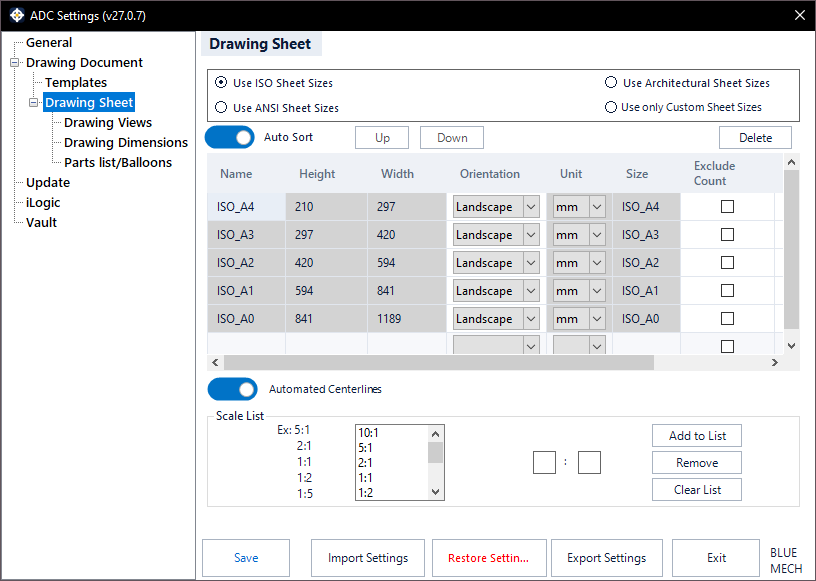
Sheet-size standard
Choose the sheet-size family ADC may use: Use ISO Sheet Sizes (A4–A0), Use ANSI Sheet Sizes (A–F), Use Architectural Sheet Sizes (Arch A–F), or Use only Custom Sheet Sizes (your own sizes).
Sheet-size list
The table lists the sheet sizes ADC is allowed to use. Auto Sort orders them automatically by dimension; turn it off to reorder manually with the Up and Down buttons. Delete removes the selected size (ADC needs at least one). The columns are Name, Height, Width, Orientation (Landscape/Portrait), Unit (editable only with “Use only Custom Sheet Sizes”), Exclude Count, Exclude Print, and Rev.
Scale List
Define the set of scales ADC is allowed to choose from (for example 5:1, 2:1, 1:1, 1:2, 1:5). Use Add to List, Remove, and Clear List to manage the entries.
Automated Centerlines
- Activated: ADC adds centerlines and center marks to your views automatically, covering common features such as holes, cylinders, cones, and slots.
- Deactivated: no centerlines are added.