This tab controls how ADC organizes the drawing documents it creates, checks whether a drawing already exists, and saves the results.
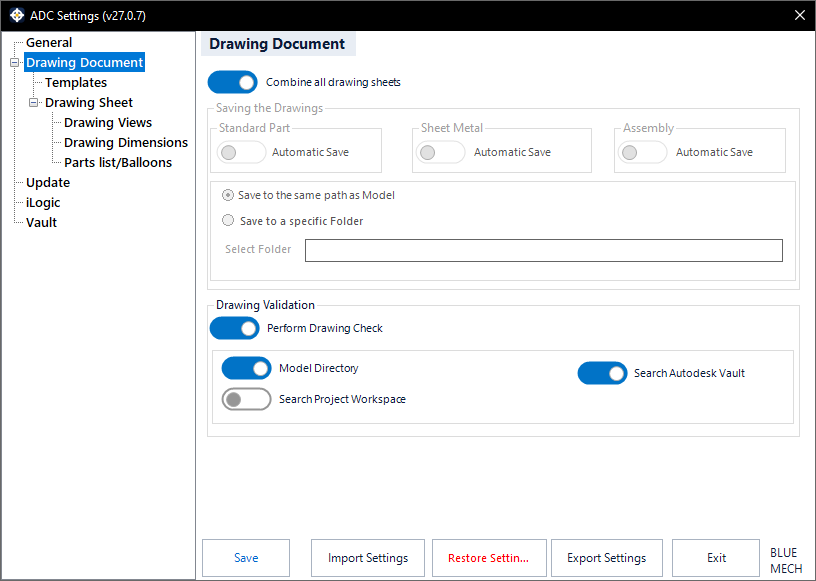
Combine all drawing sheets
- Activated: all generated sheets are placed into a single drawing document, each sheet showing a different model.
- Deactivated: ADC creates a separate drawing for each document.
Drawing Validation
Before creating a new drawing, ADC can check whether a drawing for the model already exists so it does not create duplicates.
Perform Drawing Check
- Activated: ADC looks for an existing drawing of the model before creating one.
- Deactivated: ADC always creates a new drawing.
Model Directory
- Activated: ADC searches for the existing drawing in the model’s own folder.
Search Project Workspace
- Activated: ADC also searches the sub-folders of the active Inventor project (.ipj) workspace.
Searching Autodesk Vault for existing drawings is coming in a future release.
Saving the Drawings
Available when “Combine all drawing sheets” is deactivated. You can let ADC save assembly, sheet-metal, and standard-part drawings automatically using the Automatic Save option for each model type. When automatic saving is off for a type, ADC leaves those documents open and unsaved, which is not recommended when processing many documents.
Choose where saved drawings go: Save to the same path as Model (recommended) places each drawing in its model’s folder, while Save to a specific Folder lets you pick a single destination folder with Select Folder.