This tab controls which dimensions and annotations ADC places on the drawings. The options are grouped by model type so you can dimension parts, assemblies, and sheet-metal parts differently.
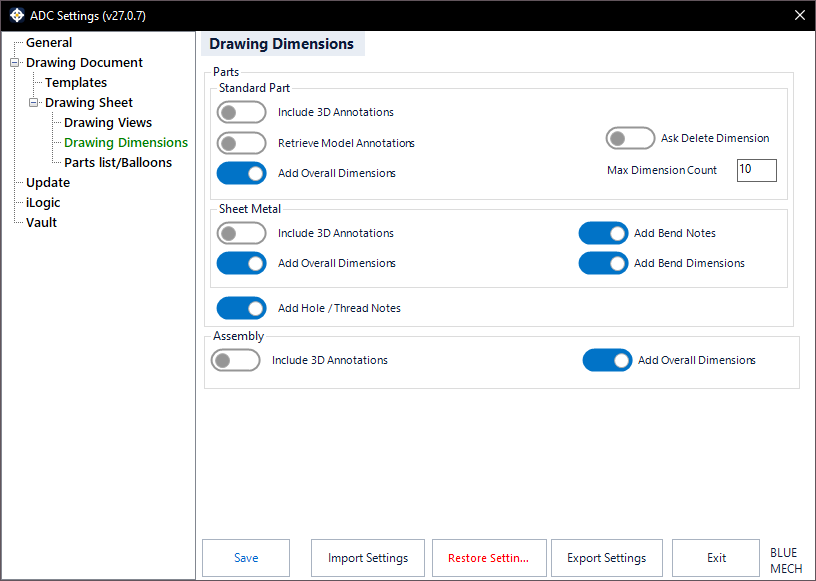
Parts
Add Hole / Thread Notes
- Activated: ADC adds hole and thread notes to the views.
Standard Part
Retrieve Model Annotations
- Activated: ADC retrieves the model’s dimensions and annotations onto the drawing.
Add Overall Dimensions
- Activated: ADC adds overall (bounding) dimensions.
Include 3D Annotations
- Activated: ADC imports the model’s 3D annotations onto the drawing (Inventor 2022 and later).
Max Dimension Count
When the number of retrieved dimensions on a view reaches this value (for example 10), ADC lets you choose whether to keep or delete them, helping you avoid clutter.
Ask Delete Dimension
- Activated: ADC prompts before deleting dimensions.
Assembly
For assembly views, Include 3D Annotations imports the model’s 3D annotations and Add Overall Dimensions adds overall (bounding) dimensions.
Sheet Metal
For sheet-metal views, Include 3D Annotations imports the model’s 3D annotations and Add Overall Dimensions adds overall dimensions.
Add Overall Dimensions also controls the material thickness dimension. Length, width and thickness are the three envelope sizes of a sheet-metal part, so they are switched on and off together. ADC places the thickness once, on the view that shows the material edge-on — if no view does, it is left out. It is added when the drawing is created, not by Update.
Add Bend Notes
- Activated: ADC adds a bend note to each bend line on the flat-pattern view.
Add Bend Dimensions
- Activated: ADC adds bend dimensions to each bend line on the flat-pattern view.