This tab controls which Inventor drawing templates ADC uses, and how it reads the drawing border and title block.
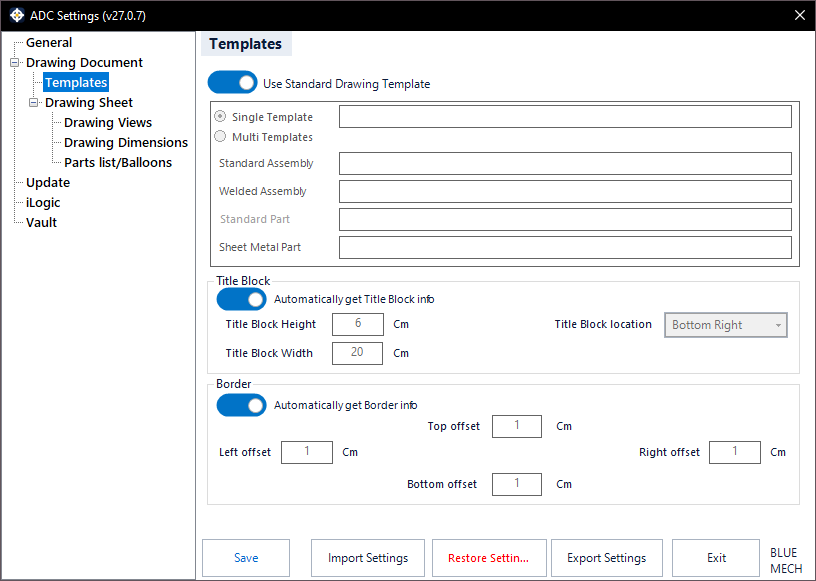
Use Standard Drawing Template
- Activated: ADC uses the standard Inventor drawing template of the active project (set under Project Folder Options).
- Deactivated: ADC lets you choose your own templates below.
Single Template
- Activated: ADC uses one selected drawing template for every drawing it creates.
Multi Templates
- Activated: ADC uses a different template per model type. Assign a template for Standard Assembly, Welded Assembly, Standard Part, and Sheet Metal Part by clicking each selector.
Border
Set how far the drawing border sits from the sheet edge using the Left, Right, Top, and Bottom offset values (in cm).
Automatically get Border info
- Activated: ADC reads the border information from the template automatically.
- Deactivated: set the border offsets manually.
Title Block
ADC uses the title-block size and location to position views correctly on the sheet.
Automatically get Title Block info
- Activated: ADC detects the title block automatically.
- Deactivated: enter the title-block details manually below.
Title Block Width / Height
Enter the title-block dimensions (in cm) when not detecting them automatically.
Title Block location
Choose where the title block sits on the sheet so ADC can lay out the views around it.