A flat pattern is only correct for the machine that forms it. The blank Inventor gives you is the one implied by the unfold rule in the model — which is the designer’s assumption, not necessarily your fabricator’s.
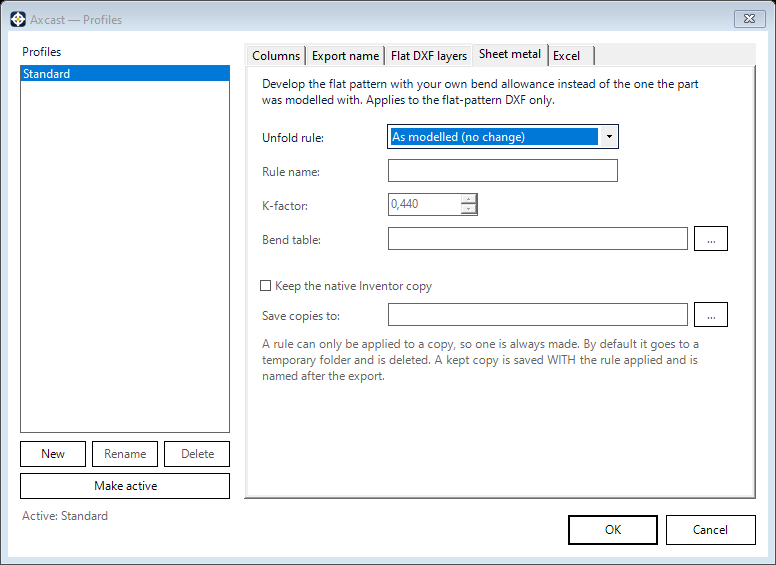
The Sheet metal tab lets you cut the blank to the shop’s bend allowance at the moment of export. It applies to the flat-pattern DXF only.
Your model is never modified
This is the important part. The rule is applied to a throwaway copy, and the file you have open is left exactly as it was — same unfold rule, same blank, not even marked as changed. You can export a part to three different shops’ allowances one after another and the source document is untouched every time.
Choosing the rule
- As modelled — leave it alone and export the blank the model already implies
- K-factor — enter the K value your fabricator works to. This is the standard K-factor convention, so the number the shop quotes is the number you type
- Bend table — point at a bend table file instead. If your shop has a real table, this is the better instrument: it carries the machine’s actual behaviour across thicknesses rather than one figure applied to everything
- Rule already in the model — develop the blank with an unfold rule the document already carries, without re-entering its values
Rule name sets the name the generated rule is given. Values that are not physically sensible are refused rather than quietly accepted.
Keeping the native copy
Keep the native Inventor copy saves the part the rule was applied to, named to match its DXF, into a folder you choose. It never overwrites an existing file. This is worth switching on when someone downstream may ask to see the model the blank actually came from.
What you get back
When a rule is in play, the component list can show which rule produced each blank, the blank size, and how far that differs from the blank the model would have given — so a part whose flat length moved by two millimetres says so, in the list, before the file goes to the shop. Parts whose individual bends override the rule are flagged, because on those the rule does not tell the whole story.