Model Assistant is the counterpart of Drawing Assistant for parts and assemblies: a set of one-click helpers for Autodesk Inventor models, for the small jobs that come up every day.
The tools
- BOM Sort and BOM Reset — beside the Bill of Materials command of an assembly. See BOM Sort and BOM Reset.
- Open Drawing — opens the drawing of the active part or assembly. See Open Drawing.
- Clean Sketches — removes broken projected geometry from a part’s sketches. See Clean Sketches.
- Slot Mid-Axis, Content Center visibility and Toggle Orig. Work Planes — see Slot Mid-Axis, Content Center visibility and work planes.
Where to find it
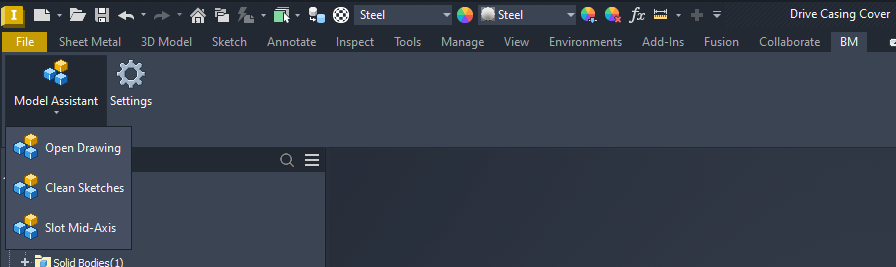
- On the BM tab of the Part and Assembly ribbons, the Model Assistant panel holds a Model Assistant menu (Open Drawing, Slot Mid-Axis and, in parts, Clean Sketches), the CC Visibility menu in assemblies, and Settings.
- In an assembly, a BOM menu sits right after the Bill of Materials command on the Assemble and Manage tabs.
- In an assembly, right-click selected components for Model Assistant › Toggle Orig. Work Planes.
Formerly SMA and CC Visuality
From Axion 27.1.7, the Slot Mid-Axis (SMA) and CC Visuality add-ins are part of Model Assistant and are no longer sold separately. An existing SMA or CC Visuality licence stays valid and still unlocks the tool it was bought for. A Model Assistant or All-Apps licence unlocks every tool.
Compatibility and licensing
Autodesk Inventor 2020–2027. Model Assistant is part of the BLUE MECH Axion add-in family and is included from Axion 27.1.7. Every function is licensed, with a 15-day trial. Installation and licensing work the same as for every other module — see Installing BLUE MECH add-ins and Licensing, trials & updates.