BOM sort decides the order of the rows in your parts list. You set it once, on up to three columns, and the modules that build parts lists all follow it — so a drawing made by one behaves the same as one made by another.
Used by: ADC (Parts List/Balloons → Sort BOM → Setup) and Drawing Assistant (Settings → BOM Sort…). Both present this same dialog, but each module keeps and applies its own setup. Setting a sort in one does not change the other, so configure it in whichever module you use.
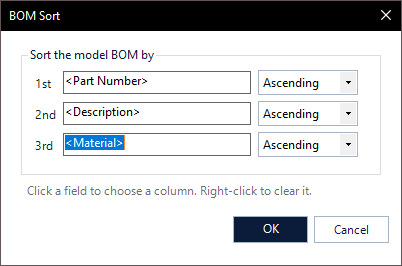
Setting a sort
- Click a field (1st, 2nd or 3rd) to choose the column to sort on. This opens the Property Composer, which offers the real columns of your model, including your own iProperties.
- Pick Ascending or Descending beside it.
- Right-click a field to clear it. The 2nd and 3rd keys are optional — one is enough.
The 1st key is the main order. The 2nd is only used where two rows are equal on the 1st, and the 3rd where they are equal on both. Three is Inventor’s own limit, which is why there are exactly three.
Text or numbers — decided for you
There is deliberately no text/number switch. Whether a column should sort as text or as numbers is a property of the data, not a preference: 2, 10 belongs in numeric order, while N_1234, SH-500 belongs in alphabetical order. The values in the column are read and the right comparison is chosen, which is both more accurate than a checkbox and one less thing to get wrong.
Default
A fresh installation sorts by Part Number, ascending. A saved setup is never overwritten, so this only affects new installations and new profiles.
Good to know
- Sorting orders the rows; it does not renumber them. Item numbers come from the BOM. In ADC, parts lists are also sorted on item number when they are created, so numbers and order agree.
- The sort applies to the model BOM, which is what the parts list is built from.
- In ADC, the component filter preview is shown in this same order, so what you see while filtering matches the parts list you will get.
- ADC stores its sort per settings profile, so different projects can sort differently. Drawing Assistant keeps one setup that applies everywhere. The two are independent.
- Column names follow the language of your model’s BOM. If a sort key stops working after a language change, reopen this dialog and pick the column again.