The Property Composer is the shared property picker. Wherever a BLUE MECH module asks you to choose a property — a filter column, a sort column — this is the window that opens, so you learn it once.
You will see it from:
- Component filters — the Pick… button beside Property.
- BOM sort — clicking any of the three sort fields.
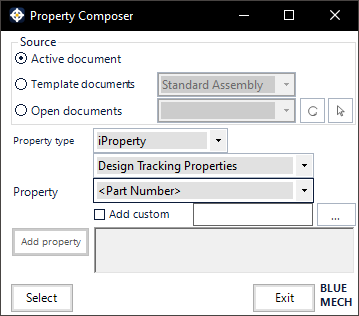
Source
Where the list of available properties is read from:
- Active document — the document you currently have open.
- Template documents — one of your Inventor templates, chosen in the drop-down beside it. Useful when the property you want is defined in your template but not yet on the open document.
- Open documents — any document open in this Inventor session, chosen in the drop-down beside it.
The source only decides whose property list you are browsing. What you pick is the property itself, and the module then applies it to every component it processes — not just to the document you picked it from.
Choosing the property
Three drop-downs, narrowing from left to right:
- Property type — the kind of property, for example iProperty or Parameter.
- Property set — which group it lives in, for example Design Tracking Properties. This is where Inventor keeps most of the familiar fields.
- Property — the property itself, for example <Part Number>.
Then click Select to hand it back to the window you came from. Exit closes without choosing anything.
Add custom
Tick Add custom and type a name to use a custom iProperty that is not in the list — for example one your templates define but the current document does not have yet. The … button beside it helps you browse for one.
Good to know
- Your choice is language-independent. The property is stored in a fixed internal form, not by the label you see, so a filter or sort built on a German installation works unchanged on an English one.
- The Property Composer replaces the window you came from and returns you to it when you close — one window at a time.
- Available in every language the add-ins support.
- The large text area and Add property belong to the composer’s template mode, used elsewhere for building name patterns. They are switched off when you are picking a single property, which is why they appear greyed out here.