Quick access to your favourite folders and models.
What it does
Workspace is an Autodesk Inventor add-in that provides quick access to favorite folders and files and lets you get and view your models within Inventor. It bundles shortcuts, search, filtering, and model preview tools to speed up file access and workspace organization.
Key features
- Save up to 3 shortcuts to important files or projects
- Quick access to favorite folders via bookmarks
- Drag and drop to move files and folders and organize the workspace
- Search for files by name or related keywords
- Filter to display Autodesk Inventor files
- Sort the list by name, type, size or date, with up to three sort keys
- Resize the model preview pane to your viewing preference
- Open and work on non-native Inventor files
Sorting the list
The Sort button orders the file list the way you work. Sort by Name, Type, Size, Date modified, Date created or Date accessed, each ascending or descending.
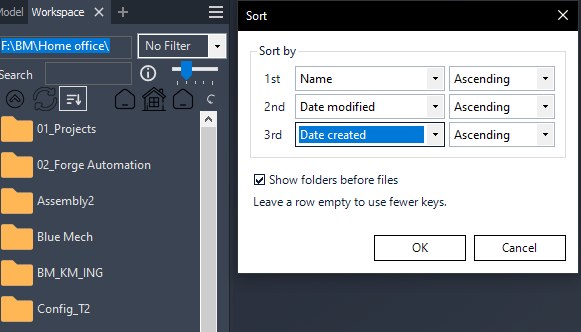
- You can set a 1st, 2nd and 3rd key, so entries that tie on the first are settled by the next.
- A column already used by one row is not offered in the others, so each key is a different column. Leave a row on (none) to use fewer keys.
- Show folders before files keeps folders above files — even when you sort descending. Descending reverses the folders among themselves and the files among themselves, but folders never drop below files. This is how Windows Explorer behaves.
- Names sort the way Windows Explorer sorts them, so Part2 comes before Part10 rather than after it.
- Your choice is saved when you press OK and still applies next time you open Inventor. It is one setting for your Windows account — every folder and every project — not per project. The default is Name, ascending, folders first.
Compatibility: Autodesk Inventor 2021–2027.